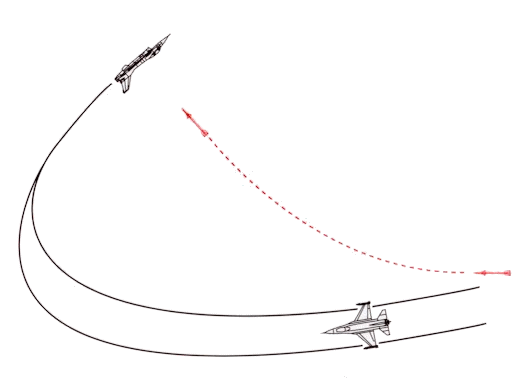
The Reversal. OK!! The attacker is sliding across our six. We want to take the fight to him by reversing into a scissors. Sounds simple…but in fact, the reversal is a bit more involved than just reversing our turn. We need to have a firm understanding of what we want to achieve and how to do it. First the “what” and then the “how”.
Your Objective In The Reversal. What are we trying to do when we reverse? Some may say that we are trying for a role reversal…make him the defender and us the attacker! First, we have to explain the significance of your 3/9 line.
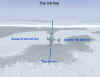
The Concept Of The 3/9 Line Advantage. Your 3/9 line defines your offensive/defensive status. If you have a bandit ahead of your 3/9 line (your “wingline”), you tend to be offensive…and if you have a bandit behind your wingline, you tend to be defensive. This becomes the crux of the issue when you reverse. How will your reversal end up? With you ahead of or behind the attacker’s wingline?
The point that we are trying to show is that your turning performance in the reversal should result in your ending up behind the attacker’s wingline (offensive)…or at least on it (neutral). If your reversal only results in you flying out in front of the attacker, then why bother?

Wing Loading’s Effect On The Reversal. In general, a fighter with a light wing loading as compared to one with a heavier loading will have a turn advantage. As a rule, if you are flying a heavier wing loaded fighter, you may not want to reverse against an attacker flying a lighter wing loaded aircraft. Be aware of your relative performance advantages/disadvantages and fly accordingly!
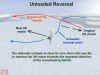
Types Of Reversals. There are two types of reversal techniques. One is an unloaded, fast rate of roll reversal. The other is a loaded up (high g) relatively slow rolling reversal. In the fast reversal, you use primarily aileron to roll with…in the high g reversal, you use a combination of aileron and rudder to roll with. For the high g reversal, the use of rudder is important since the rudder (particularly in swept wing aircraft) is often the more powerful roll control at high g (high AOA).
When would you use one versus the other? The fast, unloaded roll technique is used when an attacker is crossing your six with a fast rate and/or high angle off. In this situation, the attacker’s high speed is going to create the turning room for your reversal.
The high g loaded roll is used when the attacker is overshooting at a slow rate and/or low angle off. Here, your loaded reversal is going to produce a minimum turn radius that will create the turning room that you need.
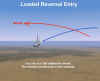
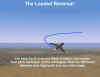
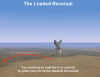
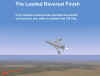
Lift Vector Control In The Reversal. Regardless of the type of reversal, when you finish the roll back into the attacker, you want to aim your plane properly. Use the concept of pulling to the “High Six” of the attacker. Do not roll out in lead pursuit or even pure pursuit. Pull to the attacker’s six initially fly to “push’ the attacker more in front of your wingline. If you can orient your lift vector “above” the attacker’s extended six (the High Six position), all the better, as you will tend to further increase your overall advantage.
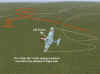
Throttle Control In The Reversal. Your objective in the reversal is a small turn radius. Speed is the enemy of a small turn radius. Your smallest turn radius will come when you turn at speeds at or below your corner velocity. Therefore, if you are above your corner velocity, then slow down as you reverse. Reduce your throttle…idle and speedbrake, if needed. As you turn, monitor your speed carefully. You do not want to get too slow. Be ready to add power as needed to hold your airspeed at or below corner.
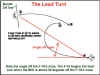
Lead Turning In The Reversal. A lead (or “early”) turn in the entry to a scissors is when the defender begins his reversal before the attacker crosses the defender’s flight path. A lead turn can be very significant to how you end up in the 3/9 line game. However, lead turns are not always advisable. In general, look for two things in the attacker when considering a lead turn…large crossing angles combined with high crossing rates. If there is any doubt in your mind, don’t lead turn! Doing so may well solve the attacker’s turn radius problem!
OK! At this point, we have covered a number of considerations that deal with how and when to reverse. Let’s move on now to how to maneuver once the scissors is established.
Section Three – Maneuvering In The Scissors
Let’s start with a few assumptions…we’ll assume the attacker has decided to scissors with you. Second, remember that we assume that we are in a “flat scissors”. Finally, I’m going to stop using the term “attacker’ and instead use the term “bandit”. If our reversal has been successful, we have at least changed a defensive situation to a neutral one…so let’s look at the other guy as now the “bandit”!
OK! What Do I Do Next?! Here we are…we’ve reversed on the bandit and we’ve pulled towards his six. Of course, he’s doing the same to us…so what do we do next to win this fight?
We have two primary objectives. We want to remain behind the bandit’s wingline, and we want to align our fuselage with his so that we can get him in our gunsight! The first objective is really a matter of our ability to control our forward velocity relative to the bandit. The second objective is dependent on our ability to “out-turn” our opponent. Let’s examine each separately.
Controlling Forward Velocity. Our forward velocity is more than just the airspeed that we see on our airspeed indicator. In the scissors, we use the position of the bandit as the measure of our control of speed. Success in a scissors depends on your ability to maintain effective control over pitch at slow speeds.
Slow Speed Contest. In a scissors, we want to “flush” the bandit out in front of our nose. In a sense, we do this by flying “slower” than the bandit. Our actual airspeed is really not that important. What is important is our forward velocity with respect to the bandit…as long as we can move him ahead of our own position, then actual indicated speed is irrelevant.
We control this forward velocity a number of ways. First, we recognize the role that trim plays in assisting our control over pitch. The second is the most obvious…we use the throttle to change our power setting. Next, we can add or subtract drag…usually by extending the speed brake or flaps. Lastly, we control forward velocity by orienting our lift vector relative to the bandit.
Trim. Back stick pressure control is very important. Anytime we relax g, we allow our forward velocity component to increase. Avoid the mistake of unconsciously relaxing back pressure on the stick. If there ever was a time to use trim when maneuvering, it is now. Trim your nose “up” and keep your lift vector oriented away from the bandit’s flight path!
Throttle Control. Throttle control in the reversal is important. If you are doing an unloaded roll in the reversal, then consider using a reduced power setting. If you are doing a loaded roll, then you may need to keep the throttle up…as much as full power, depending on your entry speed. Once you complete the reversal roll and have oriented your lift vector behind the bandit, then use power to hold your speed constant. If your nose wants to “drop”, use power to help hold it up since your thrust vector will be a component of your total lift vector.
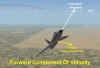
Flaps. Flaps lower your stall speed and increase your available g when below corner velocity. Consider using flaps in a scissors to allow you to fly at a slower airspeed as well as allow you to have an increased control over your stall margins.
Lift Vector Control. The direction of our lift vector determines our actual forward velocity component as the next figure shows. If possible, try to orient your lift vector behind the bandit to minimize your forward velocity.
Turn Performance In A Scissors. Turning allows us to orient our lift vector. We can improve on our turn performance by keeping these concepts in mind:
Roll Rate. As a rule, the aircraft with the faster rate of roll has a big advantage in a scissors. Typically, you can roll the quickest when you are not pulling g, so when possible, unload and then roll. This is not always possible, so be sure to use rudder to assist in rolling, particularly when rolling and pulling g.
Lead Turns. Just as important is the point at which you begin a reversal in a scissors. A lead turn is when you initiate the turn before you cross the bandit’s flight path. Your objective in the lead turn is to reduce your angle off. Eventually, you want to align your fuselage with the bandit. By using a lead turn as you minimize forward velocity, you will be able to push the bandit out in front.
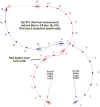
Use Of Rudder. When you are in a bank, your stall speed increases if you try to maintain level flight. You will have to increase your g to maintain level flight…and you may not have that extra g available because you are already flying close to the stall. In times like this, consider using the rudder to turn with as you use opposite aileron to hold a wings level attitude. This will take extra power due to the increased drag but it a useful technique, particularly in swept wing aircraft.
Section Four – Getting Out Of The Scissors
Eventually there may come a time when you decide things are not really going your way. You need to find a way out the scissors, but here you are, all tied up neat and close to the bandit. Is there a way out?
Yes…sometimes.
The approved solution is to get “in synch” with the bandit. Do this by lead turning him to align your fuselage as much as you can. Your objective is two-fold. One, you want to fly under the bandit to make him lose sight. Two, you want to exit to his blind side. Here’s how it works:
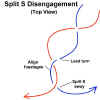
As you and the bandit approach for another crossing, lead turn him to minimize angle off. At the same time, relax a little g to descend slightly below his plane of motion. You want to begin your separation as soon as you cross under the bandit. Your separation will be a “Split S” type of maneuver.
Begin the Split S by rolling inverted relative to the bandit’s POM and simultaneously add power, use flaps, and g to achieve your max pitch rate until you have your nose pointed down. Once your dive angle is established, retract your flaps, maintain full power, and extend nose low. Remember, you may have been trimmed for a slow speed, so in the dive, re-trim to keep your nose from rising as speed increases. You do not want your nose to come up. Maintain a constant dive angle as you extend away.
As you extend, make a quick check turn into the bandit to maintain a tally. Be ready to defend again with a defensive turn. This separation maneuver may only get you out of the scissors…it may not guarantee a complete separation from the bandit.
Part Two – Flying The Scissors In A Simulation
Section One – Your View Choice
As with any BFM maneuver, you can only fly what you can see. The scissors is no different. Your ability to implement the concepts discussed in Part One is directly affected by your choice of what view you use and your proficiency with it.
You have three choices of views…snap (fixed) views, the padlock, and external views. We’ll assume you are familiar with these view types, how they are selected, how they are used, and their respective advantages and disadvantages. Since most players do not use the external view, we won’t discuss it here.
You have seen the importance of lift vector control in Part One. Your ability to orient your lift vector is the key to success or failure in the scissors. This skill is two-fold. You must be able to find and point at the bandit’s “high six”, and you must be able to recognize the initiation point for a lead turn.
We have already discussed the significance of the 3/9 line in maneuvering terms. This concept is equally important when it comes to using your chosen view. We can look at view use by considering two viewing problems…the “behind our 3/9 line” view and the “ahead of our 3/9 line” view.
Each sim has its own design for snap views. The typical design will have one view that covers the rear quarter area (approximately the 6 o’clock to 8 o’clock area), another view that covers the beam area (8:00 to 10:00 area), and a third that covers the forward quarter (10:00 to 12:00 area). For ease of discussion, all view references will be to our left side (6:00 to 12:00).
Likewise, each sim has its own padlock format. While this view may differ slightly from sim to sim, in general, the basic concept is the same. When using the padlock, you will again be presented with a two-fold viewing problem…with the 3/9 line being the dividing line between the two types.
“Behind The 3/9 Line” Viewing Problem. The first viewing situation in a scissors results from the typical defensive posture…an attack from behind our wingline. This external view shows the viewing area.
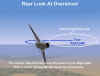
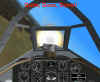
The bandit’s position makes situational awareness (SA) of our nose position difficult. This difficulty complicates our ability to maintain a good defensive turn without having to cycle our view back to a forward view to check our bank angle and pitch attitude. A typical view looks like this…from IL-2. The problem is that when in a bank, the look back view is mostly down and does not present a good picture of your six o’clock…the area that the overshooting bandit will be in.

This viewing angle is also present when we initially reverse with the bandit. We have to use a rearward looking view to keep the tally as the bandit moves from our rear quarter towards our 3 or 9 o’clock (beam) position.
Aces High has a similar view but also offers an elevated aft looking view that is an improvement in that it shows more of the sky area. Even better is the pure six view in Aces High…unfortunately, this view is missing in most sims. This view will give the best look at an overshooting bandit.
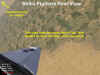
Some sims have a limited selection of rear looking views. In these cases, you may find that the rear looking view is inadequate when it comes to watching the area that an overshooting bandit will be in. The new sim, Strike Fighters, has a limited set of snap views. As you can see in this next screenshot, the Strike Fighter rear view does not adequately cover the area of the overshoot.
“Ahead Of The 3/9 Line” Viewing Problem. This viewing angle results from the initial reversal and our turn back towards the bandit. As the bandit moves from our beam towards our nose, we change our view from the side (beam) view to the front quarter view (10:00 to 11:00) and finally to the front view. The frontal merge situation is shown in this external view.

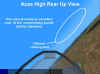
For viewing the merge as it unfolds in the scissors, most pilots will use the sim “up” views. The “up” views are focused along the lift vector. Both IL-2 and Aces High offer several “up” views. The “front up” view centers on the line of sight that is about 45 degrees above the aircraft nose and is excellent for positioning for the merge. It looks like this.

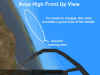
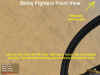
Strike Fighters comes up short again because of its limited selection of snap views. The sim does not have a “front up” view…it only has an “up” view that is focused straight up along the lift vector. As such, it has limited usability in a merging situation. The left/right up view is not effective in flying the merge as the view is centered too low as the next figure shows.
This discussion has centered on the snap view. If you are using the padlock, then some of these limitations will not exist.
Related Posts:
Related posts:
 Air Combat Basics: The Scissors Maneuver
 Page 3
Air Combat Basics: The Scissors Maneuver Page 4
Air Combat Basics: The Scissors Maneuver
Air Combat Basics: The Scissors Maneuver Page 3
Air Combat Basics: The Scissors Maneuver Page 4
 Air To Ground Basics – Bombing, Part Two Page 4
Air To Ground Basics – Bombing, Part Two Page 5
Air To Ground Basics – Bombing, Part Two Page 7
Air To Ground Basics – Bombing, Part Two Page 4
Air To Ground Basics – Bombing, Part Two Page 5
Air To Ground Basics – Bombing, Part Two Page 7
 The Falcon 3.0 Manual Tactics Section – Introduction to Defensive BFM
 The Falcon 3.0 Manual Tactics Section – Introduction to the Geometry of Air Combat