FRAPS and Simulation Size
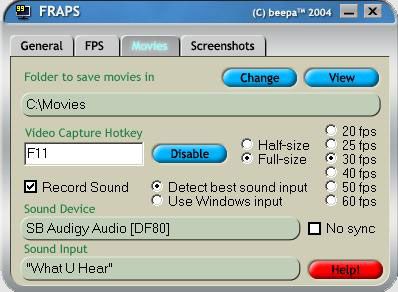
We’re going to set FRAPS up to record at 30 fps, in the full size of the simulation as displayed, with sound. One can reduce the frames per second and speed it up later in order to compensate for a slow running mission, but since there’s little going on but the battle, we’ll go full speed.
And set up the sim to run in windowed mode. I like 800×600, but 640×480 will give you good results and a smaller file size. The sim also runs faster.

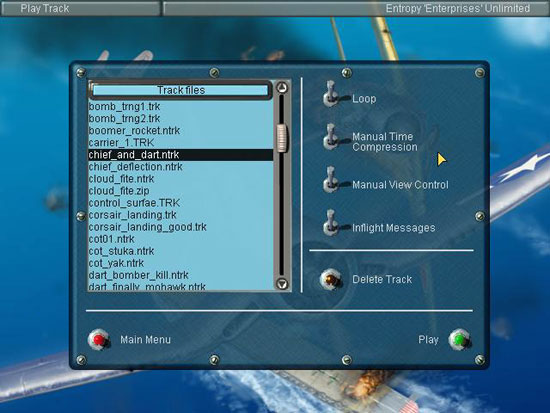
Now it’s just a matter of loading each edited track and recording them! Make sure you have the graphics settings you want, and for recording we’re not going to change any time settings, views, or show flight information:

Raw FRAPS Footage
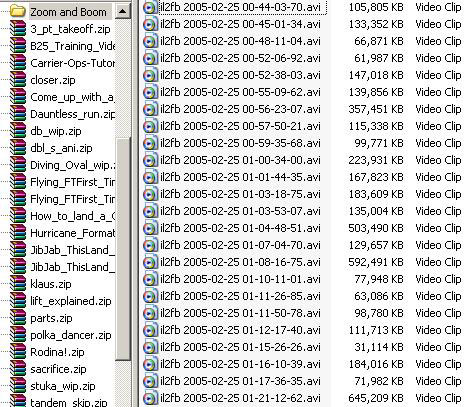
Because FRAPS is recording in “real time” the .avi files are uncompressed. They are also exactly what you see in the sim. This also means they are gigantic in size:
Related Posts:
Related posts:
 Aeroworx Beechcraft B200 Super King Air: Reality vs. Simulation Page 2
 How to Make Your Own Simulation Movies
 Page 2
How to Make Your Own Simulation Movies Page 4
How to Make Your Own Simulation Movies Page 5
How to Make Your Own Simulation Movies Page 6
How to Make Your Own Simulation Movies Page 7
How to Make Your Own Simulation Movies Page 8
How to Make Your Own Simulation Movies
How to Make Your Own Simulation Movies Page 2
How to Make Your Own Simulation Movies Page 4
How to Make Your Own Simulation Movies Page 5
How to Make Your Own Simulation Movies Page 6
How to Make Your Own Simulation Movies Page 7
How to Make Your Own Simulation Movies Page 8