Filtering and First Compression
Working with such large files is cumbersome and will probably cause all sorts of problems later on when we try to compile them with sound and transitions, so it’s time to start up VirtualDub to filter, crop, and change the codec the files. And they’re in…

First we’re going to select “Video” and then “Filters” and then select “HSV adjust.”

From here we can wash some of the color out (to give it a more “historic” look) by reducing saturation, increasing the “Value” to make it brighter. There’s a preview pane so you can see what it looks like with the filter applied. Make sure you run the clip forward to ensure your sky isn’t a deep purple!
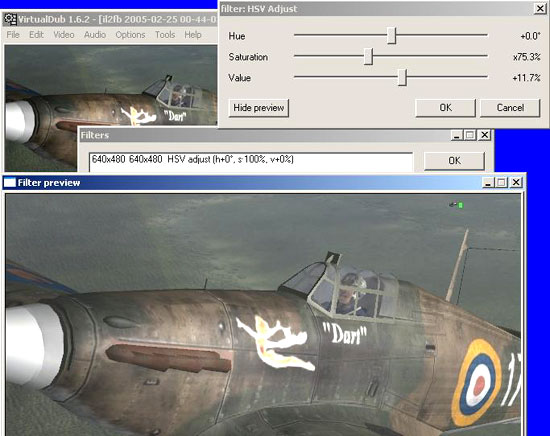
There are lots of other filters available, but today we’re just using the “HSV Adjust” because of a really valuable option that comes with it — cropping.
Since this was flown and recorded online, we have the connection bug in the right top corner and text lines where folks were saying hello, being accused of cheating, etc.
Highlight the “HSV Filter” and click on “Cropping.”
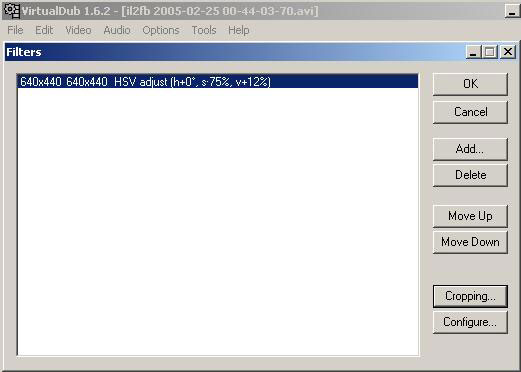
Take 40 off of the top, which will conceal the chat lines…

…then click “OK”.
Related Posts:
Related posts:
 How to Make Your Own Simulation Movies
 Page 2
How to Make Your Own Simulation Movies Page 3
How to Make Your Own Simulation Movies Page 5
How to Make Your Own Simulation Movies Page 6
How to Make Your Own Simulation Movies Page 7
How to Make Your Own Simulation Movies Page 8
How to Make Your Own Simulation Movies
How to Make Your Own Simulation Movies Page 2
How to Make Your Own Simulation Movies Page 3
How to Make Your Own Simulation Movies Page 5
How to Make Your Own Simulation Movies Page 6
How to Make Your Own Simulation Movies Page 7
How to Make Your Own Simulation Movies Page 8
 The Best Aviation Movies