But What Is It? (Multiplayer)
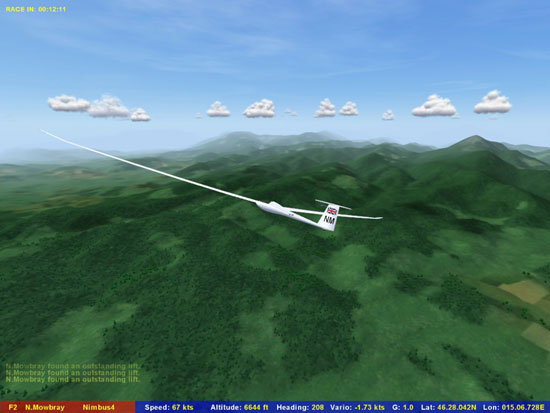
Well the full title suggests that it will be all about the racing. Yes you could be content with challenging yourself over a course; however the sim is clearly designed for multiplayer use. Up to 32 competitors can juggle around the skies in a race. The technical aspects of glider racing are beyond my scope (I’m not that good yet) but I have given it a whirl online. At first only a dedicated server was available but recently anyone can now host with a suitable server set-up. Connecting is delightfully simple: LAN, IP, or even URL fields in the menu provide the interface and off you go. You can only choose a glider from the class defined by the server which should even things out. Also there is an option to advertise your server on the Condor web site when it is active!
So How Do I Get It?
OK, so you’re sold? It’s only available online here. You can order it as a 160MB download or a CD at 40 and 50 Euro respectively; not the cheapest sim you will ever buy. I guess as a small concern the prices reflect the production run.
Will My PC Run It?
I’ve got it working just fine on a desktop and laptop but minimum requirements are as follows:
Minimum
- 800 MHz CPU
- 256 MB RAM
- 64 MB Direct 3D compatible graphics card (32-bit color capable)
- 600 MB free disk space
- 800 x 600 desktop resolution
Recommended
- 1.5 GHz CPU or higher
- 512 MB RAM or more
- 128 MB NVIDIA or ATI graphics card
- Force feedback joystick and pedals
Note that although a good joystick and rudder set-up is ideal, you can control the sim successfully with just a mouse or a joystick without rudder. Controls (i.e. rudder and aileron) can be linked by FS2004 (auto-coordination).
I deliberately have not gone into much detail regarding the set-up and interface of the sim. Needless to say it is pretty generic. Installation works simply and by default to C:\Program Files\Condor. The initial load will give you an option to name your pilot, set up a tail code and national flag. These will be displayed on every glider you fly which is a nice touch. Thereafter set-up is menu driven and is nice and simple; nothing radical here. You have a limited ability to adjust the display, which (per the specs) must be 32 bit. Increasing the quality of terrain and view distance with sliders will affect the performance on your machine.
Selection of “Activity” gives you Flight School or Free Flight, the titles of which are pretty self-explanatory. The developers recommend that you spend at least some time in flight school watching the run-throughs or participating in the tasks to learn the key and control set up. Thereafter you can custom up your own flights and alter many facets including: weather, glider type, ballast, racecourse etc.
Related Posts:
Related posts:
 “First Flight”: The Wright Flyer Experience Flight Simulator
“First Flight”: The Wright Flyer Experience Flight Simulator
“First Flight”: The Wright Flyer Experience Flight Simulator
 Condor: The Competition Gliding Simulator
 Page 2
Condor: The Competition Gliding Simulator Page 4
Condor: The Competition Gliding Simulator
Condor: The Competition Gliding Simulator Page 2
Condor: The Competition Gliding Simulator Page 4
 Flight Simulator X: Deluxe Edition Part 2 Page 11
 Flight Simulator X: Deluxe Edition Part 5 Page 10
Flight Simulator X: Deluxe Edition Part 5 Page 14
Flight Simulator X: Deluxe Edition Part 5 Page 10
Flight Simulator X: Deluxe Edition Part 5 Page 14