Rudder Commands, Response and Indicators
Why can I order rudder positions to only the nearest 5°?
Why does the rudder instantly go to the ordered position?
Where are my helm angle indicator and rudder angle indicator?
The DC rudder command system, while not strictly accurate, is probably OK as is. It limits the player to 5° rudder increments (either by mouse selection or [ ] key commands), which is fine for the majority of the time. To be completely accurate one should be able to order the rudder to the nearest whole degree — an order such as “Left twelve degrees rudder” is completely legitimate.
The game seems to place the rudder instantaneously to the position commanded. This is unrealistic. Typical steering machinery can produce rudder rates of about 3 °/sec for merchant vessels and 5 °/sec for small combatants. Thus, aboard a typical destroyer it will take approximately 7+ seconds for a rudder to go from amidships to 35 degrees.
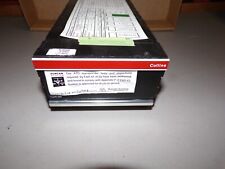
On an actual helm there is an instrument called a Rudder Angle Order Indicator. One pointer of the instrument marks where the helmsman has the steering wheel. The other pointer indicates where the rudder actually is. This indicator allows the helmsman to see if the rudder is indeed following his commands, and it is one of the primary indications of a loss of steering control. Additional Rudder Angle Indicators are placed throughout the ship where needed, such as on the bridge wings, in CIC, etc.. These indicators simply indicate the actual position of the rudder.
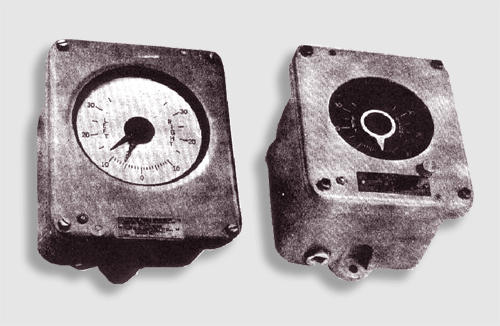
Rudder Angle Order Indicator (left) and Rudder Angle Indicator (right)
Course Commands
Why can’t I order a specific course?
There needs to be a better method whereby one can order a specific course to be steered to the nearest whole degree. The manual says I can do this by clicking on the compass in the F4 Helm view, but out of the box it doesn’t work. Even when fixed by the download patch, the screen presentation of the compass is too small to be able to pick out one degree. Alternately, one can sort of do this from the F3 Observation Deck by looking in the direction you want to steer and using the H key command. This is OK if the ship is on a steady heading, but it’s really not usable if the ship is already turning. Another method is to go to F2 CIC and adjust your next way point until it’s bearing from you is the same as the course you want to steer. The problem with this is that the ship is heading towards a geographic point, and its turning diameter may cause the resulting course to be off from that desired.
In addition to the methods already present in the game, I recommend a number pad entry system. This should include cancel and confirmation options. Alternately, arrows could be used.
Engine Commands
Why have I only got one engine order telegraph (EOT) on a twin screw vessel?
Where’s my Speed/RPM table?
Why am I restricted to Maneuvering Combinations only?
Where’s my propeller order indicator transmitter (POT)?
Where are my shaft rpm indicators?
DC portrays only a single EOT, which is inaccurate for a multi-screw vessel (DC’s single EOT is OK for a single screw vessel). Take the virtual tour of USS KIDD and you will see that each shaft has its own EOT.
On an actual ship, there are two methods by which engine orders are communicated to the engine room. The first is called Maneuvering Combinations (or Standard Order Mode) and the second is called Propeller Order. DC restricts the player to Maneuvering Combinations, which is unrealistic. The Maneuvering Combinations method is used under the conditions such as:
- Getting underway from or tying up to a pier
- Maneuvering relative to a stationary object in the water, such as a man in the water
Under all other situations the Propeller Order method is used.
Maneuvering Combinations
The reason a conning officer would choose Maneuvering Combinations can best be described by the following:
“I’m in a very tight maneuvering situation and I don’t have time to issue specific rpm orders. Each increment on the EOT corresponds to a specific rpm order — answer the same as if I gave you the corresponding rpm order. The propeller shafts on each side can have different directions ordered.”
Here are the maneuvering combinations for a 600 PSI destroyer plant (i.e., Fletcher & Sumner Class DD’s):
| AHEAD ONE-THIRD | rpm for 5 knots ahead |
| AHEAD TWO-THIRDS | rpm for 10 knots ahead |
| AHEAD STANDARD | rpm for 15 knots ahead |
| AHEAD FULL | rpm for 20 knots ahead |
| AHEAD FLANK | rpm for 25 knots ahead |
| STOP | Throttles closed |
| BACK ONE-THIRD | 60 PSI on astern turbine until 50 rpm reached, then rpm for 5 knots astern |
| BACK TWO-THIRDS | 120 PSI on astern turbine until 100 rpm reached, then rpm for 10 knots astern |
| BACK FULL | 200 PSI on astern turbine |
| BACK EMERGENCY | Astern throttle fully open |
What the conning officer wants is coarse control of thrust on each shaft. He is trying to get a linear velocity and/or a yaw rate relative to something, such as the pier.
By giving the player only a single EOT, DC does not allow the player to “twist” a twin screw vessel. For example, aboard a real destroyer, to twist the bow to port one would use an ahead bell on the starboard engine and a backing bell on the port engine.
When the ship is clear of the close quarters maneuvering situation, the emphasis shifts to controlling the ship’s speed through the water.