Propeller Order
 The reason a conning officer would choose Propeller Order can best be described by the following:
“I’m in open water. I want all shafts to have the same rpm in the ahead direction. Maintain the ordered rpm as close as you can.”
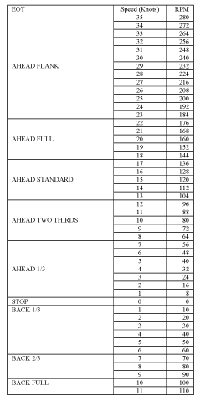
In steady state conditions the actual ship’s speed through the water is (very nearly) directly proportional to propeller shaft rpm. Each ship will have a speed/rpm table which shows the number of rpm required to attain a given speed through the water. The following table is a hypothetical speed/rpm table. These tables are posted at the EOT, the forward centerline bridge and both bridge wings.
Note: A real destroyer’s propulsion machinery can actually propel the vessel at higher speeds astern. The astern rpm limitation is the steady state astern rpm where the steering machinery can no longer hold the rudder. Exceeding this limitation can cause the rudder to be driven into the mechanical hard stops (usually set at about 38°), possibly causing damage to the steering machinery. The limitation is usually determined during the ship’s first sea trials after construction.
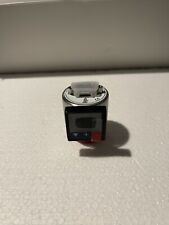
DC’s single EOT partially fulfills this function as it effectively controls both shafts, but there is no Propeller Order Transmitter (POT). In the F4 Helm View there is an attempt to illustrate the POT by two red rectangles below the EOT, but it’s not a functioning gauge. Take the virtual tour of USS KIDD and look at the EOT. You’ll see the three indicator windows and two of the three knobs. The picture below illustrates an actual POT. A POT is also provided in the real engine room to acknowledge rpm orders.
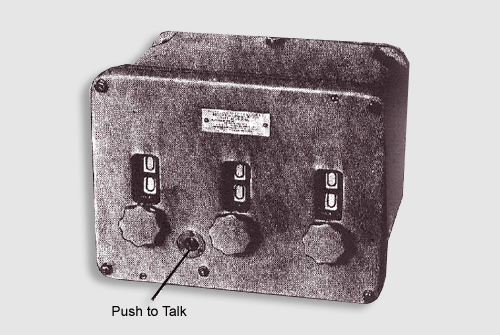
Propeller Order Indicator-transmitter (circuit M).
This device simply provides a means for the bridge to transmit the ordered rpm and for the engine room to acknowledge the rpm order. It does not indicate the actual shaft rpm — there are separate rpm indicators for each shaft.
In general, there are two types of orders issued using the Propeller Order method. The first is to order the Lee Helmsman to enter on the POT the rpm corresponding to a desired speed (usually given to the nearest whole knot). In this case I expect the Lee Helmsman to look at the Speed/RPM table, pick out the rpm for the ordered speed, and enter it on the POT.
Example:
Conning Officer: “Indicate turns for 26 knots”
Lee Helmsman: “Indicate turns for 26 knots, aye sir.” – Picks out rpm for 26 knots from Speed/RPM table and enters it on POT (assume here to be 208 RPM).
When the engine room acknowledges the POT order: Lee Helmsman: “Sir, engine room answers 208 turns for 26 knots.”
The second method is for the Conning Officer to order a specific rpm (to the nearest whole rpm). In this case I expect the Lee Helmsman to enter the ordered rpm on the POT.
Example:
Conning Officer: “Indicate 242 turns.”
Lee Helmsman: “Indicate 242 turns, aye sir.” Enters 242 rpm on the POT.
When the engine room acknowledges the POT order: Lee Helmsman: “Sir, engine room answers 242 turns.”
The latter method is used extensively for precise station keeping. While alongside a replenishment vessel 2 RPM might mean the difference between sliding forward or aft relative to the replenishment vessel.
Of course, the level of speed control really depends on the ability of the throttle men to maintain the ordered rpm. My experience was that a good throttle man could maintain the ordered rpm within ± 2 RPM, and an exceptional throttle man could maintain the ordered rpm within ± 1 RPM. An inexperienced throttle man would have large overshoots about the ordered rpm, and a complete idiot (I’ve seen them) could cause an engineering plant shut down due to excess throttle movement.
When the conning officer desires to use Maneuvering Combinations, 999 is entered on the POT. If the bridge enters a POT order for an rpm not listed in the speed/rpm table (e.g., 432 rpm are ordered), the engine room will inform the bridge that the order is not understood and maintain the current rpm order until the bridge orders a valid rpm.