DMZs
A simpler way to unblock ports for gaming is to use the DMZ feature of your router. DMZ stands for demilitarized zone, and when enabled it opens all ports to a computer. To enable DMZ, click on “DMZ” on the “Applications & Gaming” page, select the “Enable” radio button, and enter the local IP address of the computer you want to expose, and press the “Save Settings” button.
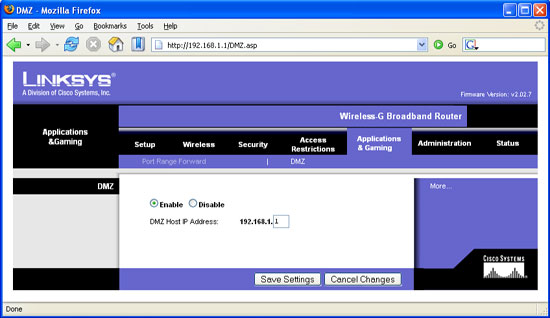
DMZ screen
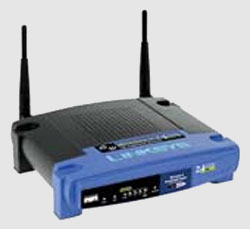
If you enable a DMZ for online gaming, you should disable it when you are done with your gaming session; leaving it on defeats the function of a NAT firewall. Selective port forwarding is more secure than gaming through a DMZ because it exposes only a few specific ports, and you don’t have to remember to turn it off. The WRT54G has a DMZ light that turns on whenever DMZ is enabled on at least one local IP address.
Joining or Hosting a Game
Setting up your computer for online gaming isn’t much fun if there’s no one to game with. One of the best places to meet people and join up for a flight is at Hyperfighter. Hyperfighter’s HyperLobby Pro is a client that facilitates online gaming by providing lobbies for people to gather by game. HyperLobby currently supports LOMAC, the IL-2 series, FSSDOE, Flanker 2.5, Falcon 4 SP3, Strike Fighters: Project 1, European Air War, WWII Fighters, IAF, Fighters Anthology, Jane’s F-15, Jane’s F/A-18, and USAF.
HyperLobby Pro can be downloaded at http://hyperfighter.jinak.cz/. Once installed, it is a simple matter of creating a callsign and a password, and you’re off. Here is the LOMAC lobby on a typical Friday night:
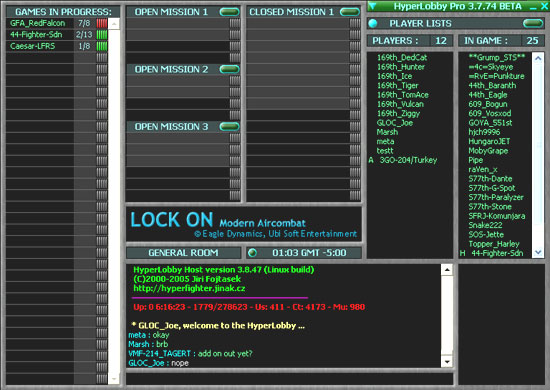
A typical Friday night
It is important to know that HyperLobby Pro will start your sim for you. Therefore, you must not have your sim running when launching into a game. You should also take care of things like graphics settings and joystick profiles before launching. It is also possible to join or host a multiplayer session by direct IP connection, without using a program like HyperLobby Pro. To do this, start your sim and enter the multiplayer area, then either enter the IP address of the host (if you are joining) or start a game and wait for others to join (if you are hosting). Note that this IP address is your “real” IP address, your external address. The easiest way to find out what this address is is to visit http://www.whatismyip.com/.
Related Posts:

Related posts:
 ARMA 3 Event – SimHQ Multiplayer Holiday Special
 Multiplayer in Blackhawk Down Page 2
Multiplayer in Blackhawk Down Page 3
Multiplayer in Blackhawk Down Page 2
Multiplayer in Blackhawk Down Page 3
 Setting Up Multiplayer: A Comprehensive Guide
 Page 2
Setting Up Multiplayer: A Comprehensive Guide Page 3
Setting Up Multiplayer: A Comprehensive Guide Page 5
Setting Up Multiplayer: A Comprehensive Guide
Setting Up Multiplayer: A Comprehensive Guide Page 2
Setting Up Multiplayer: A Comprehensive Guide Page 3
Setting Up Multiplayer: A Comprehensive Guide Page 5
 The Ultimate Difficulty Setting Page 2