Using the TripleHead2Go with Three Monitors
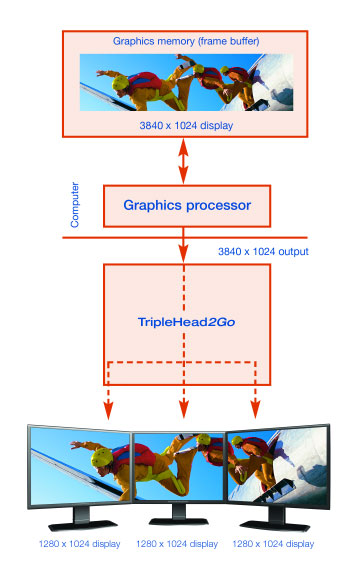
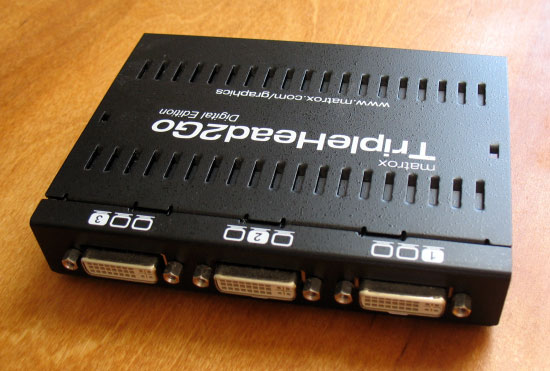
Ok, enough about single monitors. After all, if you want to run only one monitor you don’t need a TripleHead2Go. With an NVIDIA graphics card, the TripleHead2Go supports the following triple-screen resolutions and refresh rates:
- 1920×480 @ 60 Hz (triple 640×480, not available for Windows desktop)
- 2400×600 @ 60 Hz (triple 800×600)
- 3072×768 @ 75 Hz (triple 1024×768)
- 3840×1024 @ 60 Hz (triple 1280×1024)
Unfortunately, ATI cards, in both single screen and triple screen modes, have serious limits on available resolutions. I am not aware of the technical reasons as to why, but the TripleHead2Go works at full resolutions with all supported NVIDIA hardware (including SLI) while experiencing the following limits on ATI hardware:
|
Matrox TripleHead2Go
Maximum Supported Resolutions |
|||
| 2D Windows desktop |
2D fullscreen |
3D/video in a window – max window size | |
| NVIDIA GeForce 6×00, 7×00 NVIDIA GeForce Go 6×00, 7×00 NVIDIA GeForce FX 5×00 NVIDIA MX 4×0 NVIDIA SLI NVIDIA Quadro |
3840 x 1024 | 3840 x 1024 | 3840 x 1024 |
| ATI FireGL | 3840 x 1024 | 2400 x 600 | 2800 x 1024 |
| ATI Radeon (pre X1K) | 3840 x 1024 | 1920 x 480 | 1920 x 480 |
| ATI Radeon X1K | 2400 x 600 | 2400 x 600 | 2400 x 600 |
| ATI CrossFire | Not supported | Not supported | Not supported |
The advantage in this situation lies clearly with NVIDIA.
CRT Users
According to Matrox, the TripleHead2Go is primarily a product for LCD users. Considering that LCDs are becoming more widespread everyday, that three LCDs on your desk are a lot easier to manage than three CRTs, and that LCD monitor frames are generally narrower than CRT frames, this makes sense. The 60 Hz refresh rates are designed for this purpose, with the 75 Hz rate at 3072×768 existing to cater to CRT users while still allowing LCD connections at this resolution (most LCDs have a recommended refresh rate of 60 Hz and a maximum supported refresh rate of 75 Hz).
If you are a CRT user, the lack of higher refresh rates can be a major drawback. Everyone’s eyes and monitors differ, but for me (a CRT user):
- a 60 Hz refresh rate hurts
- the bigger the monitor, the more noticeable/painful the flickering at a given refresh rate
- the lighter the color displayed on the monitor, the more noticeable/painful the flickering
- the more off-axis the monitor, the more noticeable/painful the flickering
Since my two main monitors are 21″ CRTs, a desktop display using a 60 Hz refresh rate is downright agonizing (big screens, at least one is always off-axis, lots of white and light gray backgrounds in Windows, etc.). In a full-screen application such as a simulation, it is not nearly as bad for me (sometimes noticeable, almost never painful). As a result of my severe distaste for 60 Hz refresh rates, I have done my TripleHead2Go testing at 3072×768 whenever possible. At this resolution and the ensuing 75 Hz refresh rate, I can occasionally notice flickering on the desktop and never in a full-screen application.
LCD Users
LCD users do not have to worry about unacceptable refresh rates with the TripleHead2Go, but they do have to worry about aspect ratios. Most LCDs have a native resolution of 1280×1024, which is a 5:4 aspect ratio. This means that the physical ratio of the LCD screen’s width to its height is 5:4. However, the three lowest triple-screen resolutions used by the TripleHead2Go are multiples of 4:3 resolutions. If these resolutions are spanned across three 5:4 LCDs, the image could be distorted. While newer video drivers and video cards support options to maintain a correct aspect ratio and draw black bars when a 4:3 image is displayed on a single 5:4 monitor, these are dependent on the driver communicating with the monitor. Since the TripleHead2Go appears as the monitor to the video card, it is unlikely that this sort of option would be available in this situation.
If you’re thinking “no problem, I’ll just run at 3840×1024 and avoid image distortion,” consider that your video card will be calculating 3 times as many pixels as it would be at 1280×1024 or twice as many pixels as it would be at 1600×1200. The framerate impact of using triple monitor resolutions will be explored in more detail later, but for now keep in mind that these very high resolutions may not be possible, depending on the application.
EDIDs
The TripleHead2Go reports its available resolutions through the use of EDIDs (extended display identification data). 4 EDIDs are available for triplehead resolutions and refresh rates, and Matrox has chosen the four that they feel are best. In speaking with Matrox personnel, I asked whether it would be possible for the user to edit the EDID information in order to change the available resolutions or refresh rates. While there were no promises made, the answer was: not at the present time and that Matrox is exploring the issue; in the future it may be possible to offer a slightly higher refresh rate. Note, however, that a 3840×1024 display @ 60 Hz is making use of the TripleHead2Go‘s maximum bandwidth and nothing higher is possible.