Half-Life 2
TripleHead2Go Support? Yes
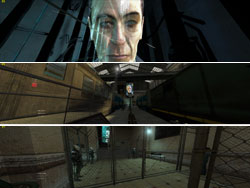
For some reason the SGU told me it could not find Half-Life 2’s config file to make modifications even though it was installed. However, everything works fine setting up 3072×768 in the HL2 options menu. The only thing to be aware of is that you must first select widescreen (16:9) resolutions for the triplehead resolutions to be available. A nice touch with HL2 is that the interface menu goes full-screen at tripehead resolutions, but it is an interface overlaid on a 3D environment, so the interface just left-justifies and you get a triplehead interface background.
I don’t play shooters much, but I own Half-Life 2 because of how everyone raved about it on the SimHQ forums at release and because I’ve seen it in action and it is clearly worth playing. I think that seeing it in triplehead may finally be the push I need to sit down and devote the time, because it really blew me away. Remember everything you have heard or learned for yourself about how cool HL2 is? Well, it’s all 3 times cooler in triplehead.
 |
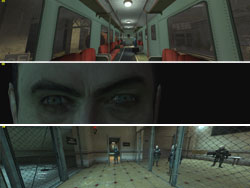 |
Below is a full-size 3072×768 Half-Life 2 screenshot.

Doom 3
TripleHead2Go Support? Yes
I used the SGU to configure Doom 3 v1.3 for 3072×768 operation. It was immediately apparent that this was causing unacceptable framerates issues. Like Lock On, this is to be expected in applications that depend heavily on GPU power. However, the higher minimum framerate necessary in a shooter makes the problem that much worse in this case.
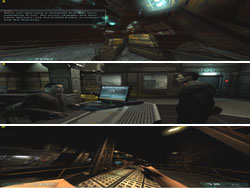
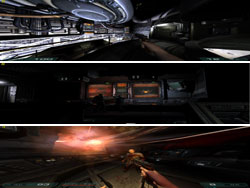
Compared to Half Life 2, the Doom 3 triplehead experience was rather underwhelming. I suspect this is due to how the SGU made config edits, as all of the images were squished in the vertical and it was impossible to walk right up to something (or to appear to walk right up to something). It was also possible to look directly down and see things behind you, which is clearly wrong. In addition, the Doom 3 menu stretches to fill to the spanned monitors, making it very hard to use, and important game text (orders, PDA, etc.) can be very hard to read as they stretch across multiple screens.
This is as close as I could get to this monitor:

Looking straight at the floor, I can see the soda machine behind me:
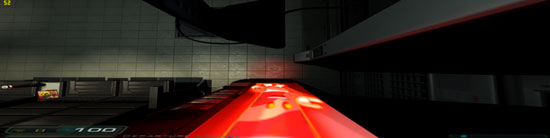
I did not spend time looking into these issues, as Doom 3 is not a simulation. Even if they could not be fixed, I’m sure the situation could be improved. However, considering the framerate and text spanning issues, it may be very difficult to play Doom 3 on three monitors that have any sort of frame edge. If there is one title I tested that fully supports triplehead resolutions but that I might rather play in single-screen mode, this would be it.
 |
 |