CH Products FlightStick Pro USB
We begin at the “bottom” of the CH Products joystick line… the FlightStick Pro USB.
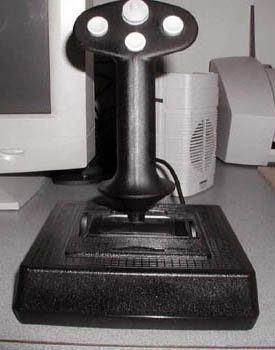
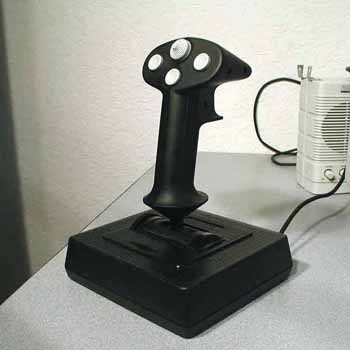
The FlightStick Pro USB is the “basic” joystick in the CH Products USB series. It is a no frills controller that is a basic 4-button/8-position hat joystick, or it can be programmed through the CH Products Control Manager utility.
Here are the FlightStick Pro USB specifications:
- Three Axis controller, X-Y, and Z
- One 8 way POV Hat
- Four buttons-Three buttons and a Trigger
- Trim wheels on the “X” and “Y” axis
Included in the box is:
- CH Products FlightStick Pro USB
- Instruction Pamphlet
- Driver and CH Products Control Manager CD
Installation was a snap. You may be tempted to plug your brand new CH Products USB unit into the nearest USB port before running the installation software, and in WIN XP it will be recognized, but you really should install Control Manager first (I recommend obtaining the latest version from the CH Products web site, I think the latest version is 4.0). The installation software will direct you through the setup. You will avoid a lot of trouble by following the instructions exactly; then everything will work properly (I speak from experience here folks!) If you do not desire to use Control Manager, then just plug in your FlightStick Pro USB and Windows will immediately recognized it as such. It did not even require calibration, but I did it anyway as per CH Products instructions.
This unit is a well-designed and comfortable control stick. It is vaguely reminiscent of the “Handle” currently in the McDonnell Douglas (Now Boeing) F-15/F-18. CH Products calls it ambidextrous, but I would hesitate to call it truly ambidextrous due to the location of the throttle wheel on the left side of the joysticks base. This just about mandates the use of the left hand for throttle actuation. There are also two “trim” wheels incorporated in the base alongside the pitch and roll axis of the stick. They allow you to trim the “X” and “Y” axis anytime you want, including during game play. This function is surprisingly useful. I use it primarily after I have sustained battle damage and the “aircraft” will not fly normally. It is much easier to trim than holding the stick “hard over” for the long flight home! The shape of the handle is on the small side, ideal for small or young players. All the buttons are easily accessed. I really like the feel of this unit… as a matter of fact, if it had more features (buttons), I would seriously consider it over the CombatStick 568. The unit installed and functioned flawlessly as a stand-alone controller, but Control Manager software will make all the buttons programmable. It will also make it possible to combineFlightStick Pro USB with other CH Products controllers into a “virtual controller” that will be recognized by Windows as a single entity. (More on this later.)

The FlightStick Pro USB exhibits the traditional CH Products quality. I have no doubt that it will serve many years through all kinds of “hard fought engagements”. Its feature set is acceptable for a basic stick, but it does lack an “R” axis control. I am not sure why CH Products decided to exclude it for a product obviously intended for the “beginner” market. Most competitors’ products do offer this capability. The list price (from the CH Products web site) Is $89.95. This seems a little expensive, especially in light of other available products. The Thrustmaster Afterburner USB is a perfect example; it has a street price of around $60.00. That is darn stiff competition for the FlightStick Pro USB.
 |
 |
I do have few reservations about where the FlightStick Pro USB was meant to “fit” in the marketplace; who is the “target customer”? The hardcore flight sim gamer will most likely want more features: The “beginner” will want a three axis (X/Y, Z, and R) single unit solution. This leaves the FlightStick Pro USB in a Joystick “no mans land”… it does not satisfy either. I guess there may be a few gamers that are only interested in the “simple” prop simulations who are willing to sacrifice extended programmability in order to save a few bucks. But why limit yourself? For just a few dollars more you can have the CombatStick 568 USB or the FighterStick USB .
FlightStick Pro USB Summary
Assets:
- Accurate and precise USB controller
- Quality construction and design
- Easy setup and calibration
- Very comfortable ergonomic design; Particularly for people with average to small hands
- Programmable with CH Products Control Manager
- Compatible with all other CH Products USB controllers
- Trim wheels on the “X” and “Y” axis
- Documentation adequate/appropriate for the unit’s complexity level
Liabilities:
- Lack of an “R” axis
- Limited number of buttons
- Expensive compared to competitors products
System Requirements:
- Windows 98, Windows ME, Windows 2000, Windows XP (or Mac OS 8.6 and above)
- Direct X 7.0a or above (Mac Input Sprockets 1.7.x)
- One free USB port
Availability & Cost:
- Available through most major gaming hardware suppliers
- MSRP $89.95, “Street / Internet Price” about $50.00
The CH Products FlightStick Pro USB is a good controller, I am sure it will provide years of reliable service. As a stand-alone joystick I would have to admit there are more feature rich products available for the same money. As part of a multi-unit HOTAS setup, theFlightStick Pro USB can be an acceptable solution if you are not really interested in a complex, mega-button configuration. Combine it with the Pro Throttle USB, and many of its limitations are nullified by virtue of significantly increased programmability. Please reference the section on CH Pro Throttle USB later in this article for more information on how to accomplish this.