Head Tracking Device
The Z800 comes with a native head tracking device. This is very similar in function to the TrackIR1. What it boils down to is a mouse pointer that is directed by head movement. The motion sensor speeds are scalable in sensitivity, X axis, and Y axis.
Standard Viewing
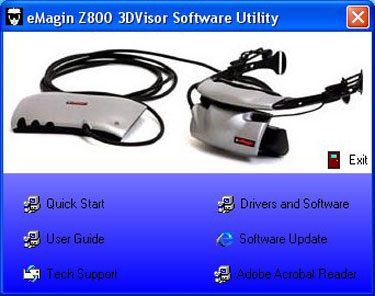
According to the product documentation the Z800 has a diagonal display of only 0.59“. The effect is of a 105 inch display viewed at 12 feet. This description is accurate and it sure does feel like it is a large screen. The best way to describe the screen is that it looks like you are in a theater.
The Z800 supports a viewing of 800×600 at a 60 Hz refresh rate. The unit can be adjusted from the main control panel for: Pixel Clock, Phase, Brightness, Positioning in the horizontal and vertical, Stereo Separation, Enabling of 3D, and the enabling of an external monitor.

I used the factory set up for all testing of the unit and almost everything worked fine in this configuration. I did have to adjust the brightness with the control panel and later set up my video card settings for my personal viewing preferences.
Now if you think like me the first thing to raise a flag is the 800×600 resolution with a 60 Hz refresh rate. I find operating a normal monitor in this configuration unacceptable. Eyestrain is the biggest factor for my decision; I can live with the slightly substandard view.
The Z800 does not suffer from this configuration the way a normal monitor would. I found the picture quality to be greatly different than what a desk top monitor would be at these settings. The refresh rate is not detriment in normal viewing mode. I was completely unable to discern a lack of refresh speed. There was no apparent flashing of the screen that one would expect from a monitor set this low. Even when panning quickly in normal mode the view remained fairly stable and pretty well focused. There is some mild view degradation during a fast pan, but it is acceptable. The over all view quality is satisfactory.
There are problems though. First and foremost is the lack of modern software (games/sims) that allows a 800×600 resolution. I could not use the unit with Battle of Britain II because the software only allows a minimum resolution of 1024×768. This was a big let down for me as I wanted to see the full effect of using the Z800 with a TrackIR4
Another thing to note is some titles that allow 800×600 viewing do not support it globally. The main screen and/or set up screen may not be capable of 800×600. So the user may need to view an external monitor until the game/sim loads up the 800×600 used for play. The ability to look beneath the eyepieces that was stated earlier is a very big plus here.
3D Viewing
3D viewing is achieved by downloading the proper drivers from NVIDIA and following the detailed procedures that are printed in the hard copy manual. The list is quite lengthy so I have decided to write the major factors of what one needs to do to get the most out of the 3D experience.
The process starts and ends in the NVIDIA stereo properties tab of the video card. Once 3D is enabled the user then makes use of the Stereo Separation slider. This slider has a value from 0%-100%. 0 represents a beginner to 3d Stereo viewing, and 100 is an advanced user. 3D Depth perception is increased when the slider is moved to a higher value (15% was the best value for me). Once the value has been entered the user tests the setting in the Stereo Setup & Test tab. 3D Depth is limited to the capability of 3D models rendered in the game. Obviously some titles will fare better than others here. This is completely independent of NVIDIA and Emagin.
An example of this limit is in LOMAC: Flaming Cliffs, a title that really shines in the 3D department. The exterior views are remarkable in 3D, as is most of the cockpit, but there is a slight glitch. When looking down the pilot’s legs are rendered very realistically. However, where the knee should have a lower leg drawn, there is a rudder pedal. The resulting view is of a rudder pedal that has been surgically implanted into the pilot’s knee. Not a show stopper and not Emagin’s doing. I imagine the original designer for LOMAC never put much thought into how much 3D was going to be applied to view area below the knee.
I tested the 3D viewing with several titles but LOMAC FC was by far the best. I have put several hours flying the A-10 and F-15 in 3D mode. My A-10 flights were all low level and I have to say that the effect was profound. The impression of low level flight is magnificent! First there is the HUD and dashboard. The top of the dashboard is right there in front of me and I feel like I can reach out and put my coffee cup on top of it. Then, individual components of the gauge board are rendered in different depths. The 3D effect is very believable. It really feels like there is a dashboard in front of me.
It gets better as I un-pause the sim. Pines trees slide beneath me at 300 knots. To my left and right are the mountains also covered in foliage. Then I look up and back. The Plexiglas canopy feels like it is just an inch or so away from my face. It really feels like I can reach up and touch it. The small scratches in the glass add to the depth perception and I feel like I could lean sideways to see around the back of the ejection seat.
The canopy effect was even better in the F-15 as it is quite a bit longer than the A-10’s. Throwing the Eagle in some drastic maneuvers produced breath taking views. Spins are an entirely new creature with the Z800 as is high angle of attack stall maneuvers. When the ship is nose high/low, there is a definite “suspension of disbelief.” Altitude also feels more believable. The overall effect is truly awesome, not perfect, but awesome nonetheless.
I chase around a couple of MiGs for awhile. Spatially I can see them out in the air as a full blown entity and not as a TV style image. The planes feel like they are a physical distance from me. I can see the glint of metal in the sun, and when they turn their profile is 3D and wonderful.
After the cool factor has subsided I decide to engage a few targets. My first victim is a IL-76 that is lumbering around an airfield. I look down at the throttle quadrant and watch as I rotate off the power. The motion of the device is in itself a beautiful thing to behold. At a range of two miles I begin to focus on the giant aircraft out in front of me. I watch as the shape grows and find myself thoroughly enjoying the closure to target. Once in gun range I let the F-15’s 20mm fly. Smoke billows out from the beast as it takes evasive maneuvers. Once again the cool factor shoots up. This time it is the smoke. I fly through it and at times it encompasses my ship and I feel like I am in a tunnel. Another burst causes the enemy to explode. Pieces fly in many directions. The effect of 3D on distance is sheer genius. The smoldering pieces get closer or further depending on my flight path. I zoom down below the debris and look up to watch the debris as it falls around me. For the first time in my life I am in an interactive 3D world; A 3D combat flight world!
Unfortunately this story is not all good and I believe I have found where the low refresh rate may have hurt this product. While panning my view in 3D it becomes blurred. The faster the pan, the more blurring. Even worse, when the pan is fast, and the blur is strong, I start to feel confused, and it takes a second for my eyes and brain to decode what is happening. Any target I was tracking is no longer a factor. I need to concentrate on seeing more than anything because my view doesn’t make sense. Once the pan stops, and my eyes recuperate, all is fine again. I don’t think it needs to be mentioned, but this really detracts from the experience. Then one needs to take into account what this does to situational awareness. Finally, this puts an enormous strain on the eyes.
The problem may be with the 3D drivers but I doubt it. After reviewing what starts the blur I think I can pretty much narrow it down to the refresh rate. When the view is panned swiftly the combination of stereo effect (basically a blurred image), and the large area of view covered, cause a blur. This can only be compounded by the low refresh rate as the sim renders the world around the aircraft. I’m no 3D expert so this is purely my opinion.
Situational Awareness
TrackIR is a beautiful creature that has been firmly planted on most simmer’s “to buy” list. It’s up there with HOTAS and rudder pedals. When I received this assignment I was thinking that the Z800 just might be the next item on the list.
Right, time to gear up. Z800 on, 3D on, TrackIR hat on. Time to tear some holes in the LOMAC sky again. I’m going to try and keep the panning issue out of this but it does detract from the experience.
Easing the throttle forward on the A-10 I push the nose down. Valleys up ahead to the right and flats leading to the ocean on the left. The route choice is easy… valley crawl. Armed with a view control that requires no hands, I slip into a deep valley. As I go knife edge I look straight up to keep an eye on the walls. My turn is coming up fast and I wait for just the right moment to load up G’s and cut into a new valley. Never once do I look down at my console, there is no need. What I need to do is watch that wall. TrackIR and the Z800 have rid me of my need to fumble my view to keep track of everything. If I need to know some pertinent information such as airspeed, I merely glance. Merely glance, sounds so casual, but it’s not!
TrackIR is hampered by the fact we have to keep eyeballing the monitor. Obviously extreme head rotation can make viewing the monitor difficult. At times I have to close one eye to lessen the effect my nose has on my vision when panned to the extreme left or right.
The TIR-Z800 configuration does not suffer from the aforementioned problem. You probably have guessed where this going by now. That’s right, if you want to look in your rear oblique to check for bandits, you merely look there. Talk about cool factor, this is off the chart! Our primary sense is view. When you take the TrackIR, and marry it to the Z800, you have increased the ocular sensation of flight enormously.
What does this equate to in combat? Well, let’s think this through. First, we no longer have to keep our eyes on the monitor in front of us. A huge advantage in its own right. Next, if the sim supports 6DOF we feel as if we are truly inside our vehicle. Even if the software doesn’t support 6DOF we still have the 3D. Combine 6DOF and 3D rendering and we’re starting to see a large advantage developing as we feel like we are part of the aircraft. Then we go on to how much work load is being taken up by our TIR-Z800 combo. As I have said previously, I merely look where I want to, that’s it. It’s natural, there’s no panning overshoot or worry of panning being too slow/fast and/or inaccurate. This alone has to put a user of this type of arrangement at a considerable advantage above the traditional monitor user, and even a monitor user with a TrackIR, plus our eyes are always focused directly on the center of the screen.
As a complete package the effect is stunning and profound. While flying I found that I was rubber necking and moving my body exactly like the real fighter pilots we see in videos. Looking straight up, craning over the shoulder, you name it. Merely flying around is a joy.
Come combat time mundane tasks such as panning view is now a no-brainer, and the “used to be tedious process” of gauge glancing is downright easy. Tracking targets is a breeze and I did not lose contact with one single target in all my hours of flying. It’s very hard to lose your target, just keep looking at it. Gauge glance around all you want, the target will be where you left it, or at least in the close proximity of where it was, and all you have to do is look there. There is no inaccurate view button or mouse to manipulate. Just look! I have to say even with its defects the Z800-TrackIR4 combo was an exciting experience.
Related Posts:

Related posts:
 Emagin’s Z800 Head Mounted Display
 Page 2
Emagin’s Z800 Head Mounted Display Page 4
Emagin’s Z800 Head Mounted Display
Emagin’s Z800 Head Mounted Display Page 2
Emagin’s Z800 Head Mounted Display Page 4
 Matrox TripleHead2Go Page 3
 NaturalPoint TrackIR™ 5 Page 4
 NaturalPoint® TrackClipPRO™ Page 3
 The Falcon 3.0 Manual Tactics Section – Introduction to Head-On BFM
 TrackIR2 by NaturalPoint Page 4