by Bubba “MasterFung” Wolford
Introduction
 AMD is today attempting to leapfrog Intel in the processor wars by launching their new Athlon 3200+ chip which if your like most people and relate AMD’s model numbers and compare them directly to Intel’s processor speeds, would put AMD on top when compared to Intel’s 3.06GHz (533MHz FSB) or the newer 3GHz P4 running on a 800MHz FSB.
The main reason AMD moved to model numbers is because of the disparity between their CPU speeds and those that Intel was launching. There is no doubt that when Intel’s Pentium 4 first launched it was a step backwards as AMD carried the crown with little challenge from higher clocked, yet slower performing, Pentium 4 processors. Those were great days for AMD!
Soon after the Pentium 4 1.7GHz and 1.8GHz processors were launched, AMD instituted the PR (Performance Ratings) and introduced the 1800+. In January of last year, we had the 2GHz Northwood core and 2000+ AMD “Palomino” core and a virtual even standstill. It seems as though that since that long ago day in January 2001, AMD has been playing a game of catch-up as Intel has continually kept just ahead in the processor wars. AMD is not just introducing their newest “Barton” core but also introducing a new Front-Side Bus (FSB).
This is not the fastest Athlon to date if you go by CPU speed alone. That title is still held by the 333MHz FSB “Thoroughbred” 2800+ which was clocked at 2.25GHz. However, as we have seen in the past, CPU speed is not the lone determinate when comparing CPUs. So, how does our new AMD Athlon 3200+ “Barton” at 400MHz FSB plan to change Intel’s world? Let’s breakdown our setup first and talk about the changes AMD brought to the table.
AMD: Increasing their Speed Limit… Athlon XP now clear for 400MHz FSB
As many of you already know, AMD uses dual pipes for their FSB, which has been 266MHz  (133MHz * 2) for a long time. When they introduced the AMD Athlon 2700+, we saw a move to 333MHz FSB (166MHz * 2) and now we have their newest processor running a cool 200MHz per pipe for a total of 400MHz FSB. Recently, Intel made their own move to 200MHz per pipe as well so we have an interesting situation occurring with both CPU companies running identical speeds down their pipes. Intel as you know uses Quad pipes for a total of 800MHz FSB.
Given that AMD uses Dual pipes would see to indicate that a move to a higher FSB might have a larger impact. It should all scale the same but the numbers will need to show how important this move to a higher FSB really plays out. What we do know is that 400MHz is where the battle rages now.
AMD has been playing with 400MHz motherboard for sometime now with nForce2 and KT-400 out. Not since PC133 have we had the two powerhouse companies locked in at the same memory speed. Sure we had the two battling it out at 266MHz DDR but Intel was still hedging its weight in the high-end on PC800 and saw DDR as a ‘mainstream’ solution. When we got our sample of Canterwood two months ago, DDR came front and center with Intel across the board.
As we know, AMD pioneered DDR into performance, mainstream and value end systems. We owe a great deal of gratitude for their foresight and leadership getting DDR out to the public. Intel seems to be leaving RDRAM in the cold and running full speed with DDR and in a big coup, was the first to full speed, dual channel 400MHz DDR with Canterwood. We know that Springdale will follow in the not too distant future for the mainstream crowd bringing Intel’s adoption of DDR full circle.
Hey Bubba, “What about heat?”
Well, I’m glad you asked! Seriously, heat continues to be a very big challenge to CPU products. Recently, after finishing my Intel Canterwood review, I decided to put the sides of my case back on that test PC.
Now, many reviewer’s test products out in the open choosing to lay a motherboard on top of a anti-static pad and run their tests in the open air. This makes testing go much smoother and faster because of not having to deal with a case and having immediate access (without obstruction) to parts. I have never done this because I don’t think it simulates what SimHQ’s readers do. I know all of you have your components in a case so having me test in the open air is not an equitable test IMO.
Now, I’m not condoning in any way those reviewers that choose to test products in the open air. I just don’t do it but I do leave the sides of my case off so I have easy access to the parts. If a case is well ventilated, this can kill proper airflow. However, in most cases, leaving the sides off is an easy way to cool off a hot PC since most don’t have the airflow properly configured.
So, after I finished my Canterwood article, I decided to put the sides on and just finish up some testing of my own. I noticed that I was starting to see a few lockups that I had not noticed before. In fact, the Canterwood system had been as stable as a rock, never crashing or locking up even once. After about 4 lockups, I knew something was wrong but had been dismissing the idea of heat because I know how cool those Northwood’s had been running.
Imagine my surprise when I touched the sides of the cases and felt genuine heat on them. The sides of the case were hot and I mean really hot! I immediately pulled off the sides and sure enough, the temperature inside that case was scorching.
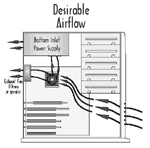
Keep in mind that I had two 120GB Seagate 7200 Drives in RAID 0 along with a Radeon 9700 PRO and a 3GHz processor. That is a lot of heat between those devices but never enough to cause lockups. It is important to remember and think about airflow in your case. The following picture was taken from this excellent .pdf on airflow available on AMD.com
While my Canterwood’s power supply is a 430Watt Antec, it still needs some more cooling it seems. In the past, my AMD machines have become quite hot as well. I can remember just touching the HSF and having the end of my finger burned. Those Palomino chips were some really hot CPUs! Meanwhile, the early Intel Northwoods could not even keep you warn on a cold day. So how was this AMD desktop?
This AMD CPU/HSF combo seemed a bit cooler than those of the past and I did not get any lockups due to heat when the case was enclosed. The main difference is that I only had one hard drive in the system and not two. The AMD case did have 2 other case fans inside which certainly increased the amount of air being pushed around.
I am pointing out the heat issue because it is so critical. If your system can’t run cool and keeps locking up, what good does it do? It’s now become a cause of frustration and not pleasure. Never go cheap on power supplies and never pass on an extra case fan or two. There is nothing more exasperating than buying a high-end system and having to drag along a desk fan to blow on your exposed motherboard so it won’t lockup. How many of you have done this at LAN meets?
Another often-overlooked area of the system is the Heat-Sink Fan (HSF). With our new 3200+, AMD sent along a new HSF for us to use. It looks similar to other AMD heat sink fans but it has a very good fan along with a lightweight cooler with good surface area. Intel has made some very nice changes to their HSF that deserve recognition too. Both companies are aware of the heat issue, which is good, but I wonder how much longer pure air-cooled units will get the job done?
Introduction: AMD Athlon XP 3200+ @ 400MHz FSB
Besides the FSB increase and an increase in CPU frequency, our shiny new XP processor running on the Barton core is essentially unchanged from the 3000+ we reviewed last month. Don’t get me wrong now, changing the frequency and FSB are two very big changes. Here is the breakdown of our chip that still includes the popular 512k L2 cache increase over the Thoroughbred core it replaced:
| Athlon XP model number: 3200+ | |
| Cache Size: | L1 – 128KB and L2 – 512KB = 640KB Total Cache |
| FSB / CPU Frequency: | 400FSB / 2.20GHz |
| Infrastructure Support: | Socket A motherboards |
| Fab location: | AMD’s Fab 30 wafer fabrication facility in Dresden, Germany |
| Process Technology: | 0.13 micron copper process technology |
| Die Size: | 101mm2 |
| Approximate Transistor count: | 54.3 million |
| Nominal Voltage: | 1.65v |
| Max Die Temp: | 85 degrees Celsius |
| Typical Thermal Power: | 60.4 W |
| Max Thermal Power: | 76.8 W |
| Icc Typical (low power state): | 7.2 A |
| Icc Typical (working state): | 36.6 A |
| Icc (processor current) Max: | 46.5 A |
I still find it amazing how graphics processors are well over 100 million transistors but CPUs are still less than half that amount. AMD just moved to the .13m process a few months ago with Thoroughbred. Barton continues with .13m and in a few months time, Intel’s roadmap shows them moving to .09m with Prescot.
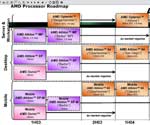
According to the roadmap, we should be seeing .09m from AMD the 1st half of 2004. As the heat increases and the speeds bumps get larger, so does the need for reduced cooling. Lower die sizes go a long way toward fixing the heat issues but don’t think that both companies are not continuing to pour some R&D toward finding cost effective ways to reducing the heat in a cost -effective manner.
AMD: Closing in on 64-bit for the Desktop
The most interesting part of the AMD roadmap is those pesky little ClawHammer boxes. They sit on that roadmap page in a very taunting manner. Just around the corner yet still out of reach. Don’t think AMD is not completely focused on getting that product out the door to put them back in the drivers seat. The assets at AMD are ‘pedal to the metal’ on 64-bit computing. It’s going to get very interesting in a few months.
As you may know, Opteron or 64-bit processing for servers was launched a few weeks ago. That was a big step for AMD and they should be applauded for getting it out the door. Intel already has their 64-bit server products on the market, which is represented by Itanium and the second generation Itanium 2. May the 64-bit server wars begin!
But we are here to talk about desktops and more specifically, AMD trying to shoot past Intel with their new 3200+ so let’s get on to our benchmarks and see if AMD was able to get the benchmark numbers up to those of Intel.