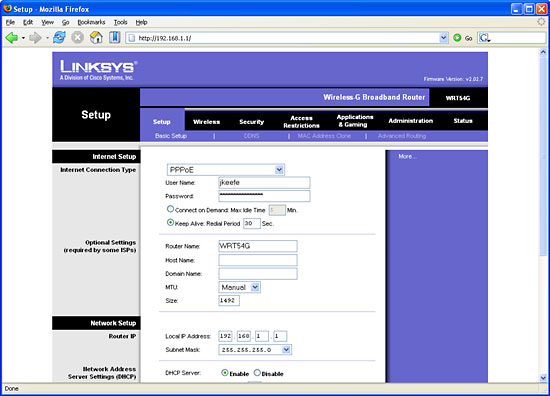
Once you type in your password, you should see something like this:
We are interesting in “Applications & Gaming”, so click on that. You will go to a screen that lets you input (surprise!) port numbers or ranges, port protocols, and local IP addresses. This is how my port forwarding is set up; it opens ports for Jane’s F/A-18, Shareaza (a file sharing program), and LOMAC:
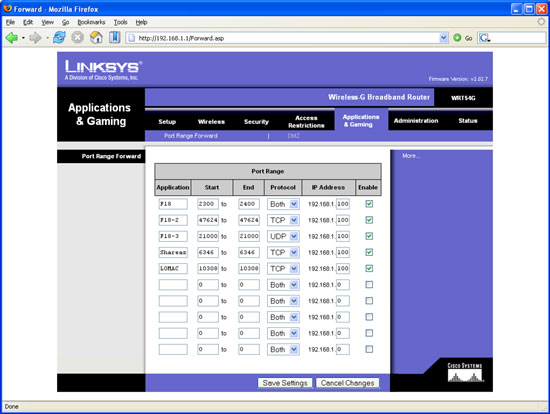
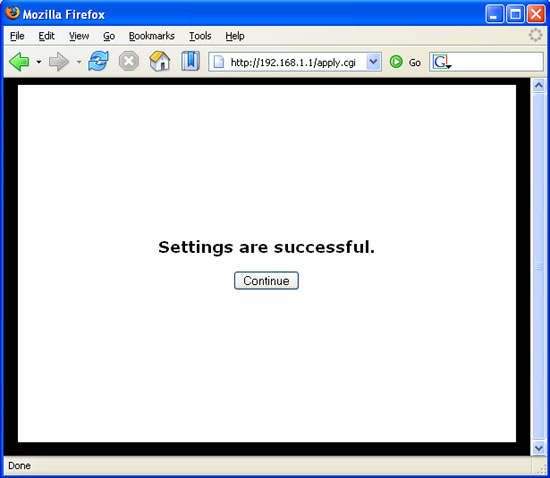
All that is required to complete the process is to input the information you previously gathered, enter an application name as a reminder, check the “Enable” box, and press the “Save Settings” button. You will be rewarded with a simple screen confirming your settings were saved.
Related Posts:

Related posts:
 Arma3 – SimHQ Multiplayer Addon Update Incoming
 Multiplayer in Blackhawk Down Page 2
 Setting Up Multiplayer: A Comprehensive Guide
 Page 2
Setting Up Multiplayer: A Comprehensive Guide Page 4
Setting Up Multiplayer: A Comprehensive Guide Page 5
Setting Up Multiplayer: A Comprehensive Guide
Setting Up Multiplayer: A Comprehensive Guide Page 2
Setting Up Multiplayer: A Comprehensive Guide Page 4
Setting Up Multiplayer: A Comprehensive Guide Page 5
 The Ultimate Difficulty Setting Page 2
The Ultimate Difficulty Setting Page 3
The Ultimate Difficulty Setting Page 2
The Ultimate Difficulty Setting Page 3