Obstacles, Emplacements, and How To Handle Them
eSim has included a number of new tactical tools in the mission editor of PE as well, and their presence in missions will make life trickier for virtual tankers.
Unlike the one-type-fits-all minefields in the original Steel Beasts, PE features five types of mine…. conventional (surface laid, or buried), advanced shaped charge anti-tank (surface laid, or buried), and scattered mines, replicating the result of a FASCAM or similar minefield deployment.
Along with the new types of mines, several other obstacles appear as well. Dragon’s Teeth are small concrete poles sticking out from the ground, rendering the area impassable to anything but infantry. Steel beams serve a similar purpose, but can be cleared by tanks with plows (more on that later). The abatis (an obstacle created by cutting trees so they fall over a road in an interlocking pattern) included in PE is perfect for clogging up those roads through the woods, and when coupled with mines can really pose a challenge to bypass. Lastly, eSim included a capability to add the now-infamous Improvised Explosive Device (IED) into the game, tying the detonation into any number of factors that may be selected by the user.
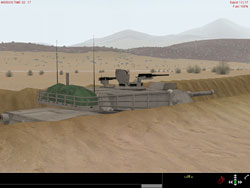
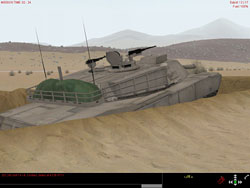
To provide defensive advantage, infantry bunkers and dug-in positions for a number of the game’s vehicles have been added as well. The former allows an infantry squad to fight from a protected position, and the latter give each of the game’s armored vehicles a custom-dug hull-down fighting position to use.
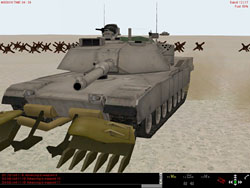
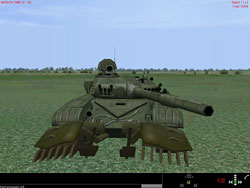
Clearing obstacles, mines, and emplacements takes some doing, and some new vehicles and tools have been added to assist. For minefields, detection is key, and the manual states that units given an order of “Scout” will look for minefields ahead. Not too well, in my experience, especially for buried mines (surface-laid ones are easily spotted), but that’s also what I would expect. After finding a minefield, the second half of the battle is then clearing it, and this is accomplished by using a tank with a mine plow / mine rollers, or a MICLIC explosive charge launched from a trailer towed by the M113 APC.
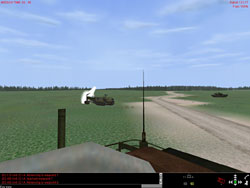
Once a minefield is detected, it is shown on the game map. Giving a plow, roller, or MICLIC unit a waypoint of “Breach” on the other side of the minefield will send them to work. The MICLIC is particularly impressive, launching its rocket and detonating a trailing ropes of explosives. Even this, however, isn’t foolproof…. it’s a very good idea to use a plow or roller vehicle to then clear the blasted lane. eSim’s attention to detail shines through again; while you can’t manually drop the plow on the tanks with a key command, you can either click on your tank’s icon and issue a Breach waypoint, or give the Breach waypoint on the map. Either action makes the plow dig in, the turret turn to the side (to avoid damaging the cannon), and the tank slow to plowing speed as it moves to the waypoint selected.
 |
 |
There doesn’t seem to be much performance impact from the mine plow, but the mine roller greatly restricts a tank’s speed and maneuverability. The plus to the roller is that as a user’s tank, it’s always working, unlike the blade, which can only be lowered in the map with a Breach waypoint.
Once a lane is cleared, engineer units in their M113 can be used to mark the safe lane with flags and signs, allowing other units to pass through. All in all, it’s a time-intensive project, and hairy under fire. It’s also, though, one of those little features that sim players typically love, showing the attention to detail.
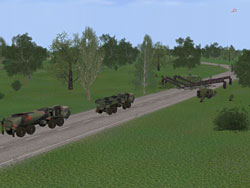
Narrow rivers and streams may be crossed with either the MT-55 or Biber bridgelayer vehicles, and detailed animations show those units at work.
 |
 |
 |
 |
 |
 |
 |
 |
Related Posts:
Related posts:
 Steel Beasts Professional – Personal Edition
 Page 2
Steel Beasts Professional – Personal Edition Page 3
Steel Beasts Professional – Personal Edition Page 4
Steel Beasts Professional – Personal Edition Page 6
Steel Beasts Professional – Personal Edition Page 7
Steel Beasts Professional – Personal Edition
Steel Beasts Professional – Personal Edition Page 2
Steel Beasts Professional – Personal Edition Page 3
Steel Beasts Professional – Personal Edition Page 4
Steel Beasts Professional – Personal Edition Page 6
Steel Beasts Professional – Personal Edition Page 7
 Steel Beasts Professional (Personal Edition)
 Page 3
Steel Beasts Professional (Personal Edition)
Steel Beasts Professional (Personal Edition) Page 3