Many of the new visible features are added by downloading texture packs that obviously replace the existing textures within the sim. Other new features have been added or changed by modifying the actual executable file that runs the sim. As each new version is released by the modders, it earns a new designation. Currently I’m using the most recently released version (1.6.2W1T7) which is at the bleeding edge of development. Occasionally when features are added bugs crop up and they are most often found in the newest version, thus the newest version is often referred to as the latest “test executable” while older versions are retained (1.6.1W4) that have been tested and found to be relatively stable and bug free.
The nice thing about the evolution of EECH is that upgrading to a new version or reverting back to a previous version is as simple as dropping the new executable file into the program directory. In addition to different executable files, there are files called WUT files (Weapons and Unit Tweaker) that allow you to change the difficulty of the game by altering the effectiveness, range, aggressiveness and other variables for all of the units within the game. What might have once been an easy stroll in the park mission has now been changed into a scramble to survive as artillery rains down on you, SAMs engage from greater distances, and enemy helicopters aggressively hunt you down. The WUT parameters are set via a WUT file that is automatically found and loaded during the program initialization. The WUT program was written by Daniel Blazevic (DeStRo).
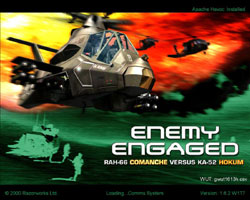
The loading screen gives us clues as to what total install you are running. If EEAH has been applied to your EECH install a note in the upper right of the screen will indicate this. The current executable version you are running is in the bottom right and the WUT file that is loading is directly above it.
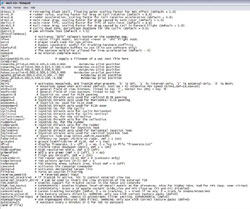
Access to many of the new executable features can be found in the eech.ini file within the main cohokumdirectory. You can open the eech.ini file with any text editing program including Notepad. Explanations of all of the selectable features within the eech.ini file can be found here on Gotcha’s web site. The specific explanation of all of the eech.ini features is located in this HTML file here. Gotcha is the King of the EECH Executable and has been the point man on moving the development of EECH forward. A glimpse of part of the eech.ini file shows that there are many new variables and settings that will tailor EECH to your particular desires and hardware.
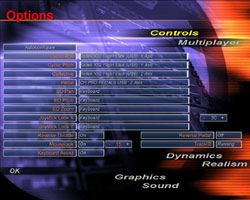
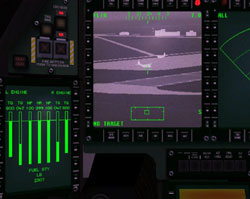
One of the great new features of EECH is the ability to specialize your controller setup (thanks Loke and Retro!). The permutations are endless, but I’ve been flying with my Saitex X52 for cyclic and collective control, and my CH Pro Pedals for anti-torque (yaw) control. It is even possible to assign the panning and tilting of the electro-optics (targeting) to your controller rotaries, but I actually prefer to use the accessory keypad on my Saitek Gamers Keyboard for that function. Additionally, you can use the mouse to control external views (ala IL2) and the mouse can also be used to move the electro-optics view on the MFD. Coupled with the new ground stabilized FLIR (denoted by an ‘S’ in the FLIR MFD) controlling the FLIR with the mouse is a breeze and is very effective (thanks Loke!).
 |
 |
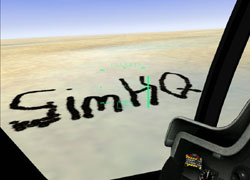
TrackIR support is now included in the new executable as well. I can’t even begin to describe how perfectly suited for TrackIR this simulation is. It is almost as though Razorworks predicted the evolution of TrackIR and made their cockpits specifically for the future. With the HUD information displayed in the center of everywhere you look it really feels like you are flying with a true IHADSS system (Integrated Helmet and Display Sight System). Not only is it very cool, but the geniuses working on the executable also managed to slave the cannon to the crosshairs of the HUD, giving your helicopter a true “look and shoot” capability just like the real thing! No longer are you constrained to cycling through targets via the sensor you have selected (FLIR/radar/EO) instead you can just look at the target and send a stream of hot lead flying toward it. With the ability to direct your fire at a precise point as you move your head, you can also do “stupid cannon tricks” like writing your name in the desert hardpan. Many thanks to Retro for adding TrackIR support to EECH.
Another feature the modders added was the ability to turn on a variable intensity tint behind the HUD square to enhance the colors of the HUD text (the color of which can also be changed) against the terrain background. This can be particularly useful when looking at very bright terrain palettes. They also added a feature where you can cycle through differing HUD sizes so users flying at extremely high resolutions (1600 x 1200) no longer have to squint to see the tiny HUD on the screen.

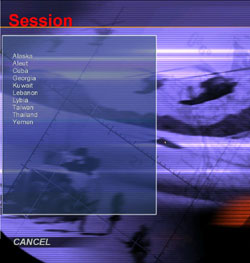
The original campaigns that were shipped with EEAH and EECH were very good and provided diverse regions to fly in. The newest versions have revamped the old theaters and added new locations as well (thanks to Rob Fox). A look at the theater selection screen shows no less than ten different theaters exist. Each theater is further subdivided into campaigns of differing difficulty, starting disposition, and goals, giving a virtually endless supply of dynamic campaign action.
 |
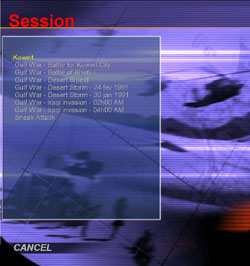 |
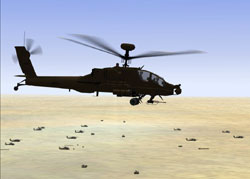
You now have the ability to fly the AH-64 Apache imported from EEAH in the new Desert Storm campaign which places you on the border of Kuwait getting ready for the big push north. The theater looks very striking with the pale desert colors and flat terrain offering little elevation to hide behind.
 |
 |
Related Posts:
Related posts:
 Enemy (RE)Engaged: EECH Revisited
 Page 3
Enemy (RE)Engaged: EECH Revisited Page 4
Enemy (RE)Engaged: EECH Revisited Page 5
Enemy (RE)Engaged: EECH Revisited Page 6
Enemy (RE)Engaged: EECH Revisited Page 7
Enemy (RE)Engaged: EECH Revisited Page 8
Enemy (RE)Engaged: EECH Revisited Page 9
Enemy (RE)Engaged: EECH Revisited
Enemy (RE)Engaged: EECH Revisited Page 3
Enemy (RE)Engaged: EECH Revisited Page 4
Enemy (RE)Engaged: EECH Revisited Page 5
Enemy (RE)Engaged: EECH Revisited Page 6
Enemy (RE)Engaged: EECH Revisited Page 7
Enemy (RE)Engaged: EECH Revisited Page 8
Enemy (RE)Engaged: EECH Revisited Page 9