Sound
Danger, expectation and inevitability best describes the mood that is set by the in game music. Sonalysts and Aberrant Sounds strived for a “military thriller” style sound and they succeeded. This is the best music in a game I have ever had the pleasure to hear.
The music has three distinct tempos:
Normal – The player is transiting somewhere, looking for someone, etc… threat level is low.
High – The player has detected incoming weapons or has launched some of his own… threat level is medium.
eHigh – Player has been hit and has taken damage.
The music is chosen at random from the available content of each directory.
As for adding to or replacing the existing music with music of your own, that is easy to do. All you need to do is convert your favorite music into 44 kHz PCM WAV files and drop them into the separate directories (as above) for the different “tension” levels.
The crews’ voices are distinct, clear and concise. How authentic is each nation’s accent? The Chinese sound like the Russians, and the Russians sound as if they do not come from Russia. My preference for voices from non-English speaking countries is that they be done in a neutral accent. Some will say that all the immersion would be lost and that it would then be impossible to play the Russians etc., I say, English speaking Russians on a Russian ship… I do not see what immersion there is to be lost. The American accent thankfully is faint.
The platform sounds are good and sound as you would expect. This type of simulation does not allow a lot of scope for creative sounds. The launching of the various weapons sounds good to a non-expert who has only seen the odd official naval video. However, the 50 caliber or a 76mm gun sounded a little off caliber.
USNI Reference
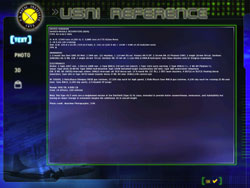
The USNI (U.S. Naval Institute) Reference is an invaluable tool and is the players Bible. The data contained within this reference helps in determining the threat posed by an enemy platform or what assistance a friendly platform may be, the speed of the platform when listening to the propeller, and to assist in a visual identification when you have not collected enough electronic data to identify the target.
In game, there are several ways to access the USNI Reference. The first method has two options — via the page down key or by using the Esc key then selecting the USNI Reference, the second method is by selecting a platform on the map then using the ‘classify contact’ menu, the third method is by selecting a platform on the map then using the ‘platform reference’ menu.
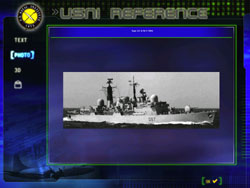
Accessing the USNI Reference via the page down or Esc key gives you the same version as is available through the main menu option. This main version of the USNI Reference allows you to select a country that will then in turn display all the in game platforms for that country. Choosing a platform then takes you to the relevant data pages, which include a real world photo where available, and the in game model.
Accessing the USNI Reference through the ‘classify contact’ menu gives you a different version of the USNI reference. This handbook version has the platforms sorted by all or submarine, surface, helicopter and plane with the platforms listed alphabetically. As with the other version, all the technical data is shown and a photo if available. No in game image of the platform is shown. The player also can change the ‘confidence’ level and ID the platform as ‘unknown’ through to ‘friendly’ or ‘hostile’.
Accessing the USNI Reference through the ‘platform reference’ menu, (Note: requires the platform to have been identified), takes you to that platform’s main page within the main version of the USNI Reference.
A nice touch would have been to have a unique naval reference for both Russia and China.
 |
 |
 |
 |